BlogWeb Development
How to Build a Professional Website in 2026
How to build a professional website in 2026: choose the right technology, avoid the traps and build a site that turns visitors into customers.

Caio Domingues · Founder and CEO, BluePaper
· 9 min read

Building a website that looks professional can feel daunting. Knowing how to build a website with the right tools gets you online fast. In this guide, we walk through the essential steps to build a website that actually works for your business.
1. Before You Build a Website: Define the Goal
Before you start, answer one question: what is your site for? Selling products? Generating leads? Showing your portfolio? A clear goal drives every decision about design, content and functionality.
Common types of websites:
- Company website: Presents your business, services and credibility
- E-commerce: Sells products online with a cart and integrated checkout
- Landing page: Focuses on a single conversion (a sale, a sign-up, a contact)
- Blog/content site: Attracts visitors with articles and useful information
- Portfolio: Shows work and past projects
2. Choose a Domain and Hosting
Your domain is your site's address (for example: www.yourcompany.com.br). Pick a name that is:
- Easy to remember and spell
- Related to your business
- Ideally a .com.br for Brazilian companies
Hosting is where your site's files live. Popular options include Hostinger, Locaweb, and AWS for larger projects.
3. Plan the Structure and Design
A good website needs intuitive navigation and professional design. The essentials:
- Home: A clear statement of what you offer
- About: Your company's story, mission and values
- Services/Products: Details of what you sell
- Contact: A form and contact information
- Blog (optional): Content that brings in visitors
Design That Converts
- Responsive: Works flawlessly on mobile, tablet and desktop
- Fast: Loads in under 3 seconds
- Professional: Visuals aligned with your brand
- Clear calls to action: Buttons that guide the visitor

4. Choose the Right Technology
Your choice of technology is probably the most important decision you'll make. Not because one option is "better" than another in absolute terms, but because each approach has very different long-term consequences.
Visual Builders: Wix, Squarespace and the Fast Track
Let's be honest: builders like Wix and Squarespace have their place. If you need to validate an idea quickly, build a personal portfolio, or put up a site for a one-off event, they can do the job well.
The challenge shows up when you need to grow. You're essentially renting a website inside a closed platform. Price increases happen (and they happen often). Moving to another technology later means rebuilding everything from scratch. And there are real performance and SEO limitations that become more obvious as your business demands more.
For many serious businesses, there comes a point where those limitations start costing more than you saved up front.
Framer: Professional Design Without Code
This is an interesting middle ground. Framer is different from traditional builders because it was made specifically for designers and teams who take design seriously.
With Framer, you get full visual control without writing code. Sophisticated animations, complex interactions, reusable components: all of it is possible. Performance is significantly better than Wix or Squarespace because the output is optimized code, not a heavy builder loading in the browser.
The limitation is deep technical customization. If you need complex integrations with internal systems, very specific business logic, or highly custom functionality, Framer will eventually hit its limits.
We use Framer for clients who:
- Need a professional website quickly (2-3 weeks vs. 2-3 months)
- Value exceptional design and want full visual control
- Need sophisticated animations and micro-interactions
- Have a budget that doesn't stretch to fully custom development
- Don't need very complex technical integrations
See how we deliver Framer projects in our case studies.
WordPress: The Risky Middle Ground
WordPress dominates the web for a reason: it's flexible and there's a plugin for everything. Need a form? There's a plugin. Need SEO? There's a plugin. Need e-commerce? WooCommerce.
The problem is that this convenience comes at a price. Every plugin is third-party code running on your site. Some are well maintained, others aren't. Security vulnerabilities in WordPress are extremely common. WordPress sites need constant updates, and every update can break something.
I've seen plenty of clients come to us after their WordPress sites were hacked, or simply became hopelessly slow after piling on plugins. WordPress works, but it demands active maintenance and constant vigilance.
Custom Development: Next.js, React and a Modern Stack
This is professional territory. Technologies like Next.js and React are what companies like Netflix, Airbnb and Nike use because they need performance, security and full control.
It's custom code, written specifically for your project. No bloatware, no unnecessary plugins, no dependence on third parties that might disappear tomorrow. The code is yours.
The obvious downside is that it takes expertise. You're not going to do this yourself over a weekend. But if your website is crucial to your business and you plan to grow, this is the right foundation to build on.
5. Development and Content
If you go with custom development, modern technologies like Next.js, React and Astro offer:
- Superior performance (sites up to 10x faster)
- SEO optimized out of the box
- A smooth user experience
- Scalability for future growth
Quality content is essential:
- Clear, to-the-point copy
- Professional, optimized images
- Strategic calls to action
- Testimonials and social proof
6. SEO and Optimization
A beautiful website that nobody can find is useless. To build a website that shows up on Google, optimize it for search engines:
- Keywords: Research and use the terms your audience searches for
- Meta tags: Optimized title and description
- Friendly URLs: Clear and descriptive
- Performance: Google favors fast sites (use PageSpeed Insights to test)
- Mobile-first: Most traffic comes from mobile
- Core Web Vitals: Key metrics Google uses for ranking
7. Launch and Maintenance
Before launch:
- ✓ Test across different browsers and devices
- ✓ Set up Google Analytics
- ✓ Install an SSL certificate (https)
- ✓ Test forms and features
- ✓ Set up automatic backups
After launch:
- Monitor performance and conversions
- Update content regularly
- Fix bugs quickly
- Make data-driven improvements
Why Hire Professional Development?
Building a basic website on your own is possible, but there's a huge difference between "having a website" and "having a website that delivers results." I've seen dozens of frustrated business owners spend months (and sometimes thousands of reais) on platforms like Wix or WordPress, only to find out the site loads slowly, doesn't show up on Google, or simply doesn't turn visitors into customers.
The truth is that professional web development goes far beyond "getting the site to show up on screen." Here are the real differences you can expect when you work with specialists:
Performance That Hits Your Bottom Line
Real Impact: A site that loads in 1 second converts 3x more than one that takes 5 seconds.
When we talk about performance, we're not just saying "a fast site is nice." We're talking about actual money. Google penalizes slow sites in search rankings. And mobile users (who are the majority) simply abandon pages that take too long to load.
We use technologies like Next.js and automatic image optimization that make sites load in under 1 second, even on 3G connections. That isn't possible with traditional site builders that load tons of unnecessary code.
Want to see examples of the high-performance landing pages we've delivered? Just ask us.
Design That Reflects Your Brand, Not a Template
Generic templates send exactly that message: generic. When someone visits your site and sees the same layout they've already seen on five other sites, your credibility takes a nosedive. We work on custom design from the wireframe down to every button, thinking about your brand, your audience and your conversion goals.
It's not about "making it pretty." It's about creating an experience that naturally guides visitors to the action you want them to take, whether that's filling out a form, making a purchase or getting in touch.
SEO Built Into the Foundation
SEO isn't something you "add later." A site's technical structure has to be designed for SEO from day one: semantic URLs, dynamic meta tags, automatic sitemaps, schema markup, optimized Core Web Vitals. These are things platforms like Wix simply can't do well because they don't give you full control over the code.
We've helped clients go from page 5 of Google to the first page in under 3 months, simply by migrating from WordPress to a well-implemented modern stack.
Technology That Scales With Your Business
Starting small is normal, but your website needs to be ready to grow. We've worked with clients who started out selling 50 products and now have catalogs with thousands of SKUs. Others started with 100 visits a month and now get thousands a day.
The difference is the architecture. Next.js, React and modern cloud infrastructure let you scale without rewriting everything from scratch. You won't need to "build another website" two years from now when the business grows.
Success Stories
We work on projects of different scales, each with its own challenges. A few examples of what we've built:
A fashion e-commerce store started with about 200 products and now manages more than 5,000 active SKUs. The site has to handle traffic spikes during sales (up to 10x normal traffic) without going down or slowing down. We also implemented a personalized recommendation system that increased the average order value by 40%.
For a B2B SaaS platform, we built a fully custom customer portal where users manage subscriptions, access reports and integrate with their own systems via API. The challenge here was security and performance with sensitive data being processed in real time.
A law firm that relied 100% on referrals now gets more than 300 qualified inquiries a month through its website. The secret wasn't just technical SEO, but creating strategic content that answers exactly the questions potential clients are searching for on Google.
We've also built landing pages for product launches that consistently convert above 12% (the market average is between 2-5%). The difference is methodically testing every element, from the headline to the color of the CTA button.
Next Steps
If you want to build a website that actually converts, performs better and runs on modern technology, let's talk. It's an investment in your business's growth.
Prefer to see examples first? Check out our case studies and see how we help companies grow online. Or meet our team and see who's behind the projects.
Frequently asked questions
- What are the steps to build a professional website?
- Seven: define the site’s goal before anything else, choose a domain and hosting, plan the structure and design, choose the right technology for the case, build it and produce the content, optimize for SEO, and finally launch and maintain it. Skipping the first step is the most common mistake: without a defined goal, there’s no way to judge whether the site turned out well.
- Which technology should I choose to build a website?
- Visual builders like Wix and Squarespace cover the fast path with limited customization. Framer delivers professional design without code. WordPress is the risky middle ground, powerful but demanding on maintenance and security. Custom development with Next.js and React is the path when performance, SEO and scale really matter.
- Is it worth hiring professional development instead of doing it yourself?
- It is when the site carries revenue. Four differences show up: performance that directly affects acquisition cost, design that reflects the brand instead of a template everyone uses, SEO built into the foundation rather than patched on later, and technology that scales with the business instead of becoming a bottleneck.
- How long does it take to build a professional website?
- It depends on scope and technology. A lean company website with a well-defined structure takes days; a site with integrations, a logged-in area or extensive content takes weeks. What stretches the timeline most is rarely development, it’s unwritten content and scope decisions that haven’t been made.
You might also like
Keep exploring our writing on landing pages and web development.

Why Your Beautiful Website Doesn’t Convert (and What to Do About It)
Your website gets compliments but no leads? The 6 reasons beautiful websites fail to convert, and how to turn good looks into real results.

How Technical Debt Quietly Kills Startups
A practical guide for founders: what technical debt is, the 7 warning signs, what it really costs, and when to invest in refactoring without stopping the company.
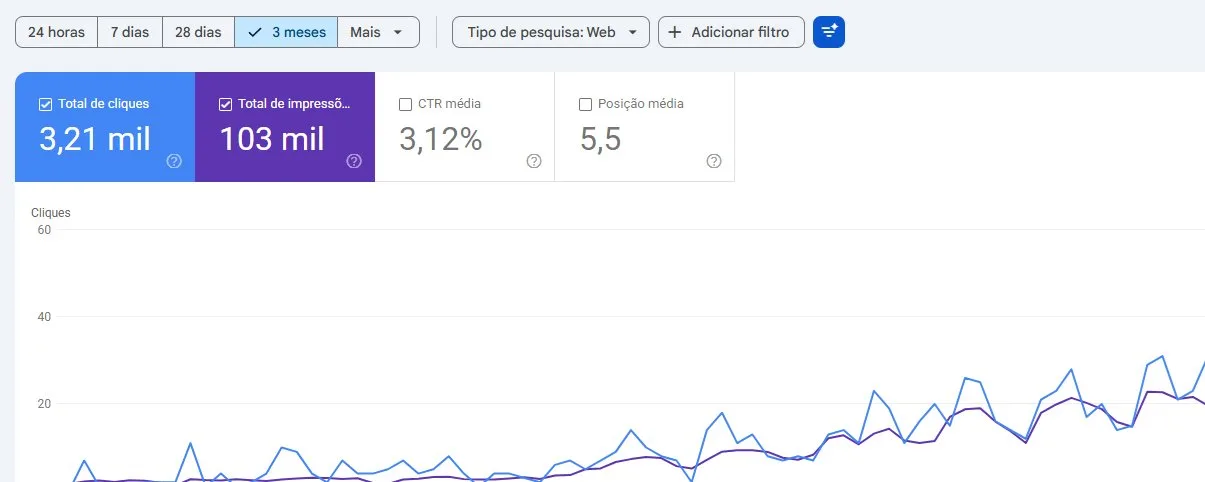
How three sites earned organic traffic on a zero ad budget: a 496,000-URL sitemap, JSON-LD, llms.txt, a .md version of every page and more than 1,000 citations in AI answers. Real numbers, including what didn’t work.